
Guide
Lower-back movement at your desk: a seated pelvic tilt
A seated pelvic tilt is one way to explore a small lower-back movement at a desk. Keep your feet and hips supported, gently roll the pelvis backward, then return. This page explains that single chair-based example; it is not a complete back workout or a treatment for pain.
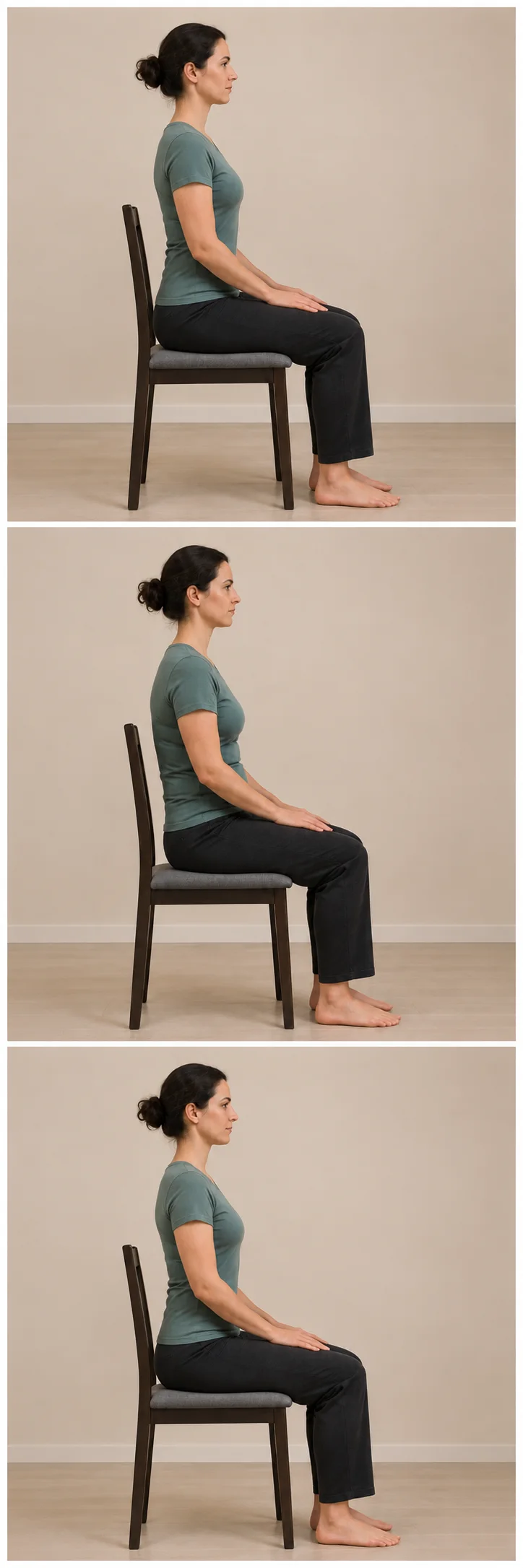
View full-size illustration
Set up the chair before moving
Use a stable, firm chair without wheels, with both feet supported. Leave room to move without resting against the backrest, while keeping the hips safely on the seat. Do not perch on an unstable edge. Clear the space around the feet.
Follow the three positions
Compare the three illustrations before trying the movement. The change is deliberately small. They show positions, not a timed video or a target range.
- Settle into a comfortable upright sitting position with the hands resting on the thighs. Let the shoulders relax; keep the feet and hips supported.
- Slowly roll the pelvis a little backward so the tailbone tucks under and the lower back gently rounds. Keep the hips on the seat and the feet down; do not pull on the neck or throw the chest forward.
- Return slowly to your comfortable starting position. Let the pelvis come forward with that return, without forcing a deep arch. Pause at rest; stop for pain, dizziness, numbness or feeling unwell.
Learn the motion before choosing a schedule
This example does not set a universal number of repetitions or a session length. The physiotherapy sources use their own care context; their counts are not a Renava desk prescription. If you have an individual plan, follow the guidance given for that plan.
Choose a format that fits the space
| Available setup | Useful choice |
|---|---|
| Stable chair with supported feet | Read and compare this small seated example. |
| Space to get down onto a mat comfortably | Check the separate lying lower-back sequence and its different supports. |
| A task or chair that does not allow a clear, stable position | Leave the screen for a change of activity rather than forcing a movement at the desk. |
Keep the workday and app routine separate
A movement break can also mean standing, walking or switching tasks. Recheck a desk that repeatedly makes you reach or lean; adding exercises does not adjust the furniture or organise your workload.
Renava’s Gentle Lower Back Mobility routine uses mat-based positions. Preview that routine’s instructions and access before choosing it. The chair example on this page is separate web material; it is not a new movement promised in the app.
Questions about this guide
How many repetitions should I do?
This page teaches the position change without a fixed repetition count. Take time to learn a small controlled movement and pause when needed. A personal exercise or care plan may give a different dose.
Should I try to make the biggest possible curve?
No. The illustration shows a small pelvic roll and return. Do not turn it into a deep back bend, force a slump or use the head to drag the body.
Does this permanently correct a pelvic tilt?
The term names the movement here. These instructions and still illustrations do not assess pelvic alignment or establish a permanent change in spinal shape.
Is the mat routine the same exercise?
No. The existing mat routine involves lying pelvic tilts, knee rolls and supported knee hugs. Its supports and intervals differ from this seated example.
Sources and editorial notes
External sources provide background and have not reviewed or endorsed Renava. Instructions and routine details describe the app team’s own material.
Follow your next session in Renava
See guided sessions, the program and your practice record. Check the current free and paid access in the app or your store before subscribing.